How LinkedIn Account Rental Works
A plain-English guide to what you get when you rent a LinkedIn account, how to set it up, and how to keep it running.
Renting a LinkedIn account means running outreach from a real, established profile instead of your own. This guide walks through how it works in practice, from picking an account to your first campaign. If you already know you want to rent LinkedIn accounts, NextGen's are a flat $59/mo in every region, and the provider comparison shows how that stacks up.
Real & Verified
Every account belongs to a real person with profile history and carries LinkedIn's Verified badge.
Proxy Protected
Residential proxies matched to each account's region.
Ready Day One
Aged accounts with established networks, ready to deploy.
Recovery First
When an account is restricted, we try recovery for up to 4 days; if that fails, we replace it free (up to 8% of your accounts a month).
What You Get
- A real LinkedIn account owned by a real person, averaging 500+ connections and over a year old
- A dedicated residential proxy matched to the account's country, used by that account only
- Access through our dashboard, where you can see each account's live LinkedIn profile before you pick it
- A setup walkthrough for your anti-detect browser and your outreach tool
- Recovery-first restriction handling: up to 4 days of recovery attempts, then a free replacement (up to 8% of your accounts a month), or immediately if you ask
- Support on WhatsApp, 7 days a week
Sample profiles from our fleet.
Real, US-based people with full work and education history, each carrying LinkedIn's Verified badge. Pick one to see it.
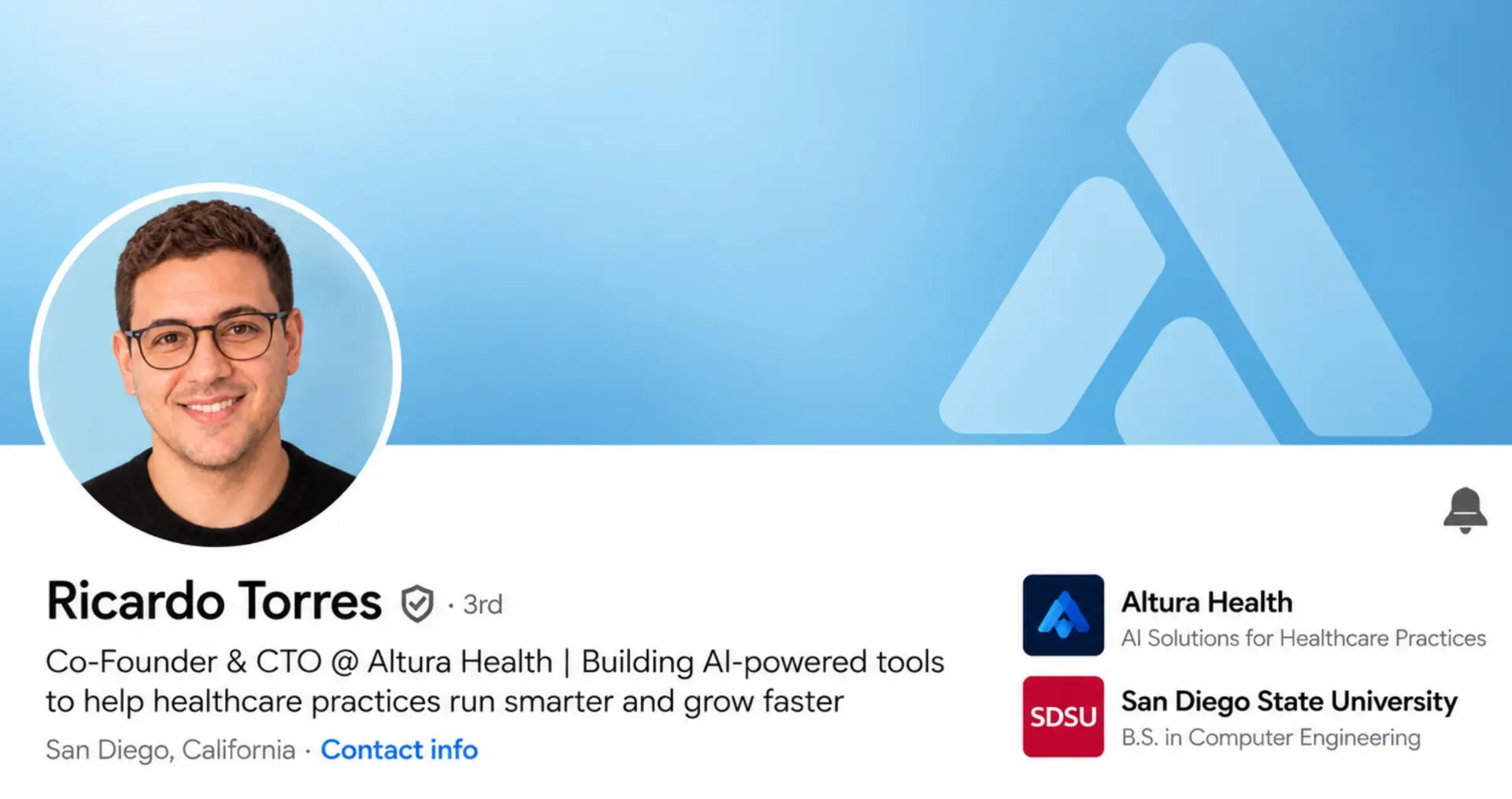
Account name and company details have been modified slightly to protect confidentiality of both. We use AI only to make the original photo look more professional — all of our account owners are real people.
Step by Step: From Signup to Your First Campaign
Here's what renting looks like in practice, from the first click to sending connection requests:
- 1. Pick your accounts. Browse available accounts by region and connection count, and check each live LinkedIn profile before you choose. Most teams start with 2 to 10 accounts.
- 2. Get the login and proxy details. Each account comes with its own dedicated residential proxy: an internet connection routed through a real home, so LinkedIn sees normal user traffic rather than a data center. For why this matters, see our residential vs datacenter proxies guide.
- 3. Create one browser profile per account. An anti-detect browser (AdsPower, Multilogin or GoLogin all work) keeps each account in its own isolated session with its own proxy, so several accounts on one computer look like separate people. Our anti-detect browser setup guide and proxy setup walkthrough cover the details.
- 4. Connect your outreach tool. Add each account to HeyReach, Lemlist, Expandi, La Growth Machine or whichever cloud-based tool you use, and build your sequence. See our sequence setup guide.
- 5. Ramp up your sending. Start below the limit and build up over the first week or two. A well-warmed account can send around 200 connection requests a week (roughly 25-30 a day). Our connection request limits guide and warm-up playbook explain the pacing.
Most teams run their first campaign within 24-48 hours of signing up, and free trial accounts are available the same day. We walk you through every step on a setup call, so you don't have to work it out alone.
How the Pieces Fit Together
A rented LinkedIn account isn't just a login and password. It's a small stack of four parts that work together so outreach can run at scale without LinkedIn flagging the account:
- The account. A real LinkedIn profile owned by a real person in a specific region, with genuine history and connections. The account holder doesn't use the profile during your rental, and NextGen handles all communication with them.
- The proxy. The account's dedicated residential internet connection, matched to its country. It stays the same for the life of the account.
- The anti-detect browser. The isolated browser profile the account always logs in from, with its own cookies, device signature and timezone.
- The outreach tool. Your automation software, which sends the connection requests and messages. The account, proxy and browser handle identity; the tool handles the sequence.
Everything except the outreach tool is included in NextGen's monthly fee. For running 10, 20 or 50+ accounts at once, see our scaling guide.
What Happens If an Account Gets Restricted
Restrictions are rare with well-run accounts (about 3% of NextGen accounts are blocked in an average month across our clients), but they do happen. Here's how it's handled:
- We try to recover it first, for up to 4 days. Because each account belongs to a real person, most restrictions can be resolved, and you keep the account's connections and history.
- If recovery doesn't work, we replace it free, up to 8% of your accounts a month. If you'd rather skip the recovery and get a replacement straight away, just ask.
- You can lower the risk yourself. Stay within sensible daily limits, always log in from the account's own browser profile and proxy, and avoid sudden jumps in activity. Our guides on how LinkedIn detects automation and recovering a restricted account go deeper.
Who Rents LinkedIn Accounts (And Who Shouldn't)
Renting solves a specific problem: you need to send more LinkedIn outreach than one account can handle, and building new accounts from scratch takes months of warm-up. It fits cleanly for:
- B2B sales teams running outreach at 500-5,000+ connection requests a week across several accounts. For the cost comparison with buying accounts, see our rent vs buy analysis.
- Lead generation agencies running outreach for several clients at once, scaling accounts up and down per client. See NextGen for agencies.
- Recruiting agencies reaching candidates or employers at volume across several roles or clients.
- Multi-channel teams running LinkedIn alongside email, with the rented accounts plugged into an existing outreach stack.
Where renting doesn't fit: a single founder doing personal outreach, campaigns that must run under one specific person's identity, or teams sending fewer than about 50 requests a week. In those cases your own profile is enough. Still unsure? Our safety guide walks through the decision.
FAQ
How do I rent a LinkedIn account?
Choose a provider, pick the accounts you want, set each one up in its own anti-detect browser profile with its proxy, then connect it to your outreach tool. With NextGen you can start with a free trial: book a short call and get 2 accounts free for 10 days.
Does renting an account put my own LinkedIn profile at risk?
No. Your own profile is never involved: rented accounts run in their own isolated browser sessions with their own proxies, so LinkedIn sees them as separate users.
How many connection requests can a rented account send?
A well-warmed, high-quality account can send around 200 connection requests a week (about 800 a month). Many lower-quality accounts top out around 100 a week. More accounts multiply your volume without any single account looking aggressive.
Do I need an anti-detect browser?
Yes, if you run more than one account from the same computer. It keeps each account's cookies, device signature and proxy separate. AdsPower, Multilogin and GoLogin all work, and we walk you through the setup.
How long does setup take?
Free trial accounts are available the same day. For paid plans, most teams are running their first campaign within 24-48 hours, after a setup call where we confirm everything works with your outreach tool.
Which outreach tools work with rented accounts?
Any cloud-based LinkedIn outreach tool, including HeyReach, Lemlist, Expandi, La Growth Machine, Skylead and Dripify. Avoid Chrome extension tools at scale, as they're easier for LinkedIn to detect.
Do I need to talk to the account owner?
No. NextGen handles all communication with account holders. You deal with one company instead of dozens of individuals in different countries.
How much does it cost to rent a LinkedIn account?
NextGen charges a flat $59/mo per account in every region, including the dedicated proxy and recovery-first restriction handling, with no setup fees or long-term contracts. Our homepage has the full price comparison.