Verified LinkedIn Accounts for Outreach
Every NextGen account carries LinkedIn's Verified badge, the shield next to the name, at a flat $59/mo with no premium for verified. Here's what the badge means, which providers offer it, and when it helps your outreach.
Searches for "verified LinkedIn accounts" usually mix together three different things: the Verified badge LinkedIn shows next to a member's name, accounts that are simply real (a genuine person behind them, which you can check on the live profile), and accounts a rental provider has vetted itself. They're not the same, and the difference matters before you pay extra for "verified." This page explains each one, compares which rental providers offer the badge, and covers when it helps. Every NextGen account carries the badge at a flat $59/mo. (The badge itself is free from LinkedIn; see what LinkedIn verification costs.)
Real & Verified
Every account belongs to a real person with profile history and carries LinkedIn's Verified badge.
Proxy Protected
Residential proxies matched to each account's region.
Ready Day One
Aged accounts with established networks, ready to deploy.
Recovery First
When an account is restricted, we try recovery for up to 4 days; if that fails, we replace it free (up to 8% of your accounts a month).
What You Get
- Every NextGen account carries LinkedIn's Verified badge, the shield next to the name, including Sales Navigator accounts
- Every account is a real person you can check before you pick it — view the live LinkedIn profile, connection count, photo, and region from the dashboard
- Flat $59/mo per account in every region, badge included — other providers charge up to $179/mo for a verified account
- Dedicated residential proxy per account and recovery-first restriction handling included
- Anti-detect browser walkthrough included — the full software stack to isolate each account
- Works with HeyReach, Lemlist, Expandi, La Growth Machine, Skylead, Dripify, and other cloud-based outreach tools
- 10-day free trial — 2 real accounts, no credit card
- Scale from 1 to 500+ accounts with predictable per-account economics
Sample profiles from our fleet.
Real, US-based people with full work and education history, each carrying LinkedIn's Verified badge. Pick one to see it.
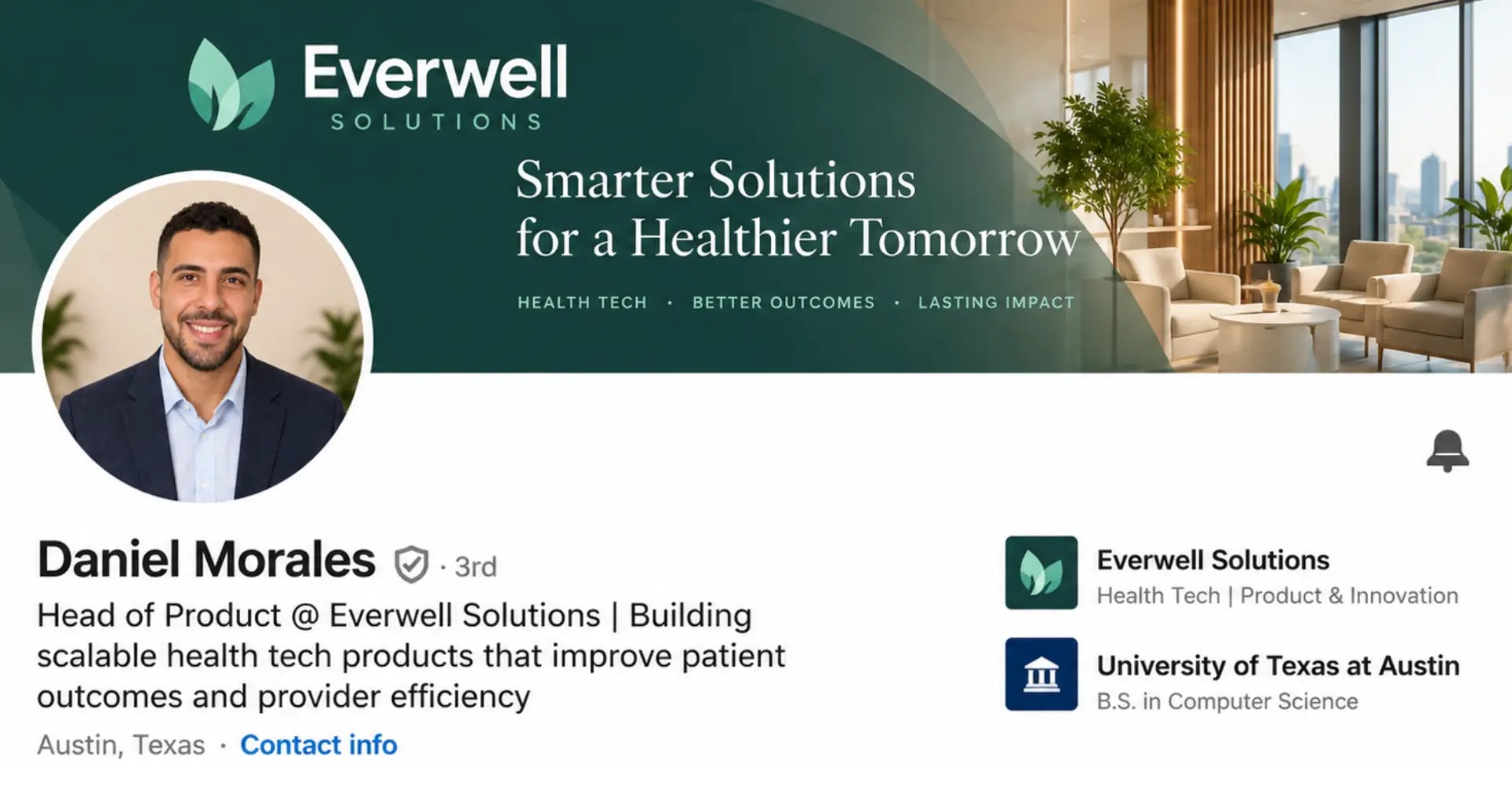
Account name and company details have been modified slightly to protect confidentiality of both. We use AI only to make the original photo look more professional — all of our account owners are real people.
Which LinkedIn Account Providers Offer Verified Accounts?
How the main rental providers handle verified accounts, taken from each provider's own website (checked October 2026).
- NextGen Profiles — every account, $59/mo. LinkedIn's Verified badge is on every account, including Sales Navigator accounts ($109/mo). No add-on and no verified premium. NextGen also offers a 10-day free trial.
- Goaccounts — every account, $143/mo month-to-month. Goaccounts says every account is ID verified. Its lowest rate (about $93/mo) needs 100+ accounts prepaid for a year. No free trial. Goaccounts vs NextGen
- LinkUnity — every account, $110–$135/mo. LinkUnity verifies every account through NFC passport checks. Volume-tiered pricing, no free trial. LinkUnity vs NextGen
- LinkedOutreach — paid add-on, $179/mo. An ID-verified profile is a $50/mo add-on on top of the $129 base price. No free trial. LinkedOutreach vs NextGen
- LinkedRent — some accounts, from $140/mo. Some accounts carry the badge, but it isn't promised on every account. LinkedRent vs NextGen
- MirrorProfiles — not offered, from $117/mo. MirrorProfiles doesn't advertise verified accounts. MirrorProfiles vs NextGen
- Outzeach — not published. We couldn't find any mention of the badge on Outzeach's site. Outzeach vs NextGen
NextGen is the cheapest way to get the badge on every account: well under Goaccounts' month-to-month price (and below even its prepaid rate), about half of LinkUnity's lowest price, and a third of LinkedOutreach's verified profile. NextGen is also the only one of them with a free trial. For the full ranked comparison, see the best LinkedIn account rental services.
The Three Things "Verified" Can Mean on LinkedIn
Before paying a premium for a "verified" account, it's worth knowing which kind of verification you're actually getting. The word covers three distinct things, and providers use it loosely:
- LinkedIn's Verified badge (the shield-with-a-check next to the name). LinkedIn adds it after a member completes one of its verification checks. It's the only "verification" LinkedIn itself displays publicly, and it's what prospects actually see.
- Real-person accounts (verifiable, but no badge). The account belongs to an actual human with a genuine work history, real connections built over time, and an active profile — but without LinkedIn's badge. You can check it's real by viewing the live profile.
- Provider-vetted accounts (a provider's own label). Some rental providers say "verified" to mean the account passed their internal quality checks — it's warmed up, has a proxy, has enough connections. This is a quality claim by the provider, not LinkedIn's badge. Useful to know, but don't confuse the two.
When a listing says "verified LinkedIn accounts," ask which of the three it means. Some providers charge a premium for accounts that carry the badge; at NextGen every account is real and carries the badge, at the same flat price.
Verified Accounts at NextGen: How It Works
There's nothing to request and nothing extra to pay:
- Every account has the badge. You don't need to ask for verified inventory. Every account in the dashboard, including Sales Navigator accounts, carries LinkedIn's Verified badge.
- No premium for verified. Every account is a flat $59/mo, badge included. Some providers charge more; LinkedOutreach, for example, adds $50/mo for an ID-verified profile.
- Check it yourself before you pick. The dashboard shows each account's live LinkedIn profile, so you can see the badge (the shield with a check next to the name) before you choose.
The badge itself is free from LinkedIn; a price only ever appears in the rental market. For the full breakdown, see how much LinkedIn verification costs.
When the Verified Badge Actually Matters (And When It Doesn't)
The Verified badge is a small trust signal in cold outreach. How much it helps depends on who you're messaging. Here's the honest breakdown:
- Matters more: senior or risk-averse audiences. Prospects in finance, legal, healthcare, and senior executive roles tend to scrutinize unfamiliar connection requests more carefully. A verification badge gives a little extra reassurance that the sender is a real, verified member. If your campaigns target these audiences, the badge can lift acceptance rates a few points.
- Matters less: general B2B outreach. For most SaaS, marketing, agency, and mid-market B2B audiences, the prospect barely registers whether the sender has a badge — they're evaluating the message relevance, the sender's headline and photo, and mutual connections far more than a small badge icon.
- Matters more: account longevity under scrutiny. A badge can give an account a small amount of additional trust-score resilience with LinkedIn's own systems, which may marginally reduce restriction frequency. The effect is modest and hard to isolate from other factors (proxy quality, warm-up, sending behavior matter much more), but it exists.
- Doesn't matter: the actual mechanics of outreach. Sending connection requests and follow-up messages works identically on badge and non-badge accounts. The badge changes how prospects and LinkedIn *perceive* the account, not what the account can *do*.
Because every NextGen account carries the badge, you don't have to decide whether it's worth paying for: you get it either way. If you're weighing a provider that charges extra for it, the cleanest test is to run the same sequence from a badge account and a non-badge account to the same audience and compare acceptance and reply rates.
How to Verify an Account Is Real Before You Rent It
Whether or not an account carries the badge, the more important question is whether it's a real person at all — because bot and AI-generated accounts get banned fast no matter what they're labeled. Five checks to run on any account before renting:
- View the live LinkedIn profile. A real account has a working LinkedIn URL you can open right now. If a provider won't show you the live profile before you commit, treat the account as unverified. NextGen's dashboard shows the live profile link for every account before you pick it.
- Check the photo against reverse image search. AI-generated faces and stock-photo faces are the fastest tell of a fake account. A real person's photo usually has a normal social footprint; an AI-generated face has none and sometimes has the subtle artifacts of generated images. Keep in mind that many real people now touch up their headshots with AI tools (NextGen does this for its account owners), so a polished photo on its own doesn't mean the account is fake. The question is whether a real person stands behind the face, which the other four checks answer.
- Look at connection count and pattern. Real accounts have connections built over time — typically 200+ for a usable outreach account — with a mix of industries and a plausible network. A bot account often has a round number, no engagement, or connections that don't match the stated career.
- Read the work history for coherence. A real profile has a career that makes sense: roles that progress, dates that line up, companies that exist. Fabricated profiles often have vague titles, impossible timelines, or employers you can't find.
- Confirm the warm-up and proxy story. Ask how long the account was warmed up and what kind of proxy it runs on. A real, rentable account has months of warm-up and a dedicated residential proxy. "Instantly available, no proxy" is a sign of a freshly created or bot account that won't survive a campaign.
These checks separate real accounts from bot accounts, which is the distinction that actually determines whether your campaign survives. A real-person account is far more valuable than a "verified"-labeled bot account. For the broader picture of evaluating rented accounts safely, see our safety guide, and for how account quality drives restriction rates, our restriction guide. For how account age and connection depth factor in, see our aged accounts and accounts with connections guides.
FAQ
What is a verified LinkedIn account?
One that shows LinkedIn's Verified badge, the shield next to the member's name. LinkedIn adds it after the member completes one of its verification checks. 'Verified' is also used more loosely to mean any real-person account, or an account a rental provider has vetted internally, so when evaluating an offer, ask which is meant. Only the badge is LinkedIn's own verification.
Can I rent verified LinkedIn accounts?
Yes. Every NextGen account carries LinkedIn's Verified badge, at a flat $59/mo per account in every region, or $109/mo with Sales Navigator Core included.
Do verified accounts cost more?
Not at NextGen: every account is a flat $59/mo, badge included. Elsewhere, Goaccounts' verified accounts are $143/mo month-to-month, LinkUnity's cost $110–$135/mo, and LinkedOutreach charges $179/mo for an ID-verified profile. LinkedIn itself grants the badge free; see how much LinkedIn verification costs.
Are NextGen's profile photos edited?
Yes, lightly. We touch up each account owner's real photo with AI tools so it looks like a professional headshot. The person in the photo is the real account owner; we never use AI-generated faces or stock photos.
What is the shield with a check on LinkedIn?
That's LinkedIn's Verified badge. The small shield-with-a-checkmark icon next to a person's name means the member has completed one of LinkedIn's verification checks. It's LinkedIn's way of publicly showing that the account belongs to a verified member.
Do I need verified LinkedIn accounts for outreach?
It helps more with some audiences than others. The badge is a small trust signal that matters most when messaging senior or risk-averse audiences (finance, legal, healthcare, executives) and less for typical SaaS, marketing or mid-market campaigns. What matters far more is that the account is real, well warmed-up, and running on a dedicated residential proxy. With NextGen you don't have to choose: every account has the badge at the standard price.
Are verified LinkedIn accounts safer from restrictions?
Marginally, but it's a small effect. A verification badge can give an account a little extra trust-score resilience with LinkedIn's systems, which may slightly reduce restriction frequency. But the factors that actually determine whether an account gets restricted — proxy quality, warm-up, sending volume relative to the account's trust tier, message-template variation — matter far more than the badge. Don't rely on a badge to protect an account you're operating aggressively; the operational fundamentals are what keep accounts alive. See our restriction guide for the full picture.
What's the difference between a verified account and a real account?
A real account has an actual person behind it with a genuine profile and history. A verified account also carries LinkedIn's Verified badge. A badge-verified account should always be real, but not every real account has the badge. Every NextGen account is both: real, and verified.